Beats by Dre is an Apple-owned consumer-audio brand known for wireless headphones, earbuds, speakers, charging accessories, and audio products designed for Apple and Android devices. Beats Electronics, LLC is commonly listed at 8600 Hayden Place, Culver City, CA 90232.
The official Beats support number for the United States and Canada is 1-800-442-4000. This number is used for Beats purchasing assistance, recent-order questions, product support, and related help through Apple. It should not be described as the direct telephone number for the Culver City corporate office.
Apple handles most Beats technical support, orders, warranties, repairs, replacements, privacy requests, and customer-service complaints. Parent-company corporate matters can be directed to Apple Inc. at One Apple Park Way, Cupertino, CA 95014, or by calling 1-408-996-1010.
Beats by Dre Corporate Office and Headquarters Contact Information
- Legal Company: Beats Electronics, LLC
- Brand: Beats by Dre
- Parent Company: Apple Inc.
- Commonly Listed Beats Office Address: 8600 Hayden Place, Culver City, CA 90232, USA
- Beats Support Phone Number: 1-800-442-4000
- Beats Support Coverage: United States and Canada
- Apple Corporate Headquarters Address: Apple Inc., One Apple Park Way, Cupertino, CA 95014, USA
- Apple Corporate Office Phone Number: 1-408-996-1010
- Apple Online Store and Order Support: 1-800-MY-APPLE or 1-800-692-7753
- Apple Retail Customer Care for Certain Damaged or Incorrect Direct Orders: 1-800-676-2775
- Apple Chief Executive Officer: Tim Cook
- Apple Chief Financial Officer: Kevan Parekh
- Corporate Status: Apple subsidiary
- Parent Company Stock Symbol: AAPL on Nasdaq
- Official Beats Website: BeatsbyDre.com
- Official Beats Support: Beats Product Support
- Contact Beats Support: Apple Support for Beats
- International Beats Support Numbers: Beats Telephone Numbers by Country
- Beats Frequently Asked Questions: Beats FAQs
- Beats Service and Repair: Apple Service and Repair for Beats
- Check Warranty or AppleCare Coverage: Apple Coverage Check
- Apple Repair Status: Check Repair Status
- Find an Apple Store or Authorized Service Provider: Apple Service Locations
- Apple Online Order Status: Apple Order Listing
- Apple Returns and Refunds: Apple Return Policy
- Beats User Guide: Official Beats User Guide
- Find a Beats Serial Number: Beats Serial Number Instructions
- Register Beats: Register a Beats Product
- Find Lost Beats: Locate Beats With Find My
- Apple Service Programs and Recalls: Apple Service Programs
- Beats Pill XL Recall: Beats Pill XL Recall Program
- Apple Privacy: Apple Privacy Policy
- Apple Privacy Request Portal: Manage Apple Privacy Data
- Report Counterfeit Products: Apple Counterfeit Reporting
- Beats Careers: Apple and Beats Careers
Beats and Apple do not prominently publish general operating hours for a Culver City corporate switchboard. Support availability can vary by country, product, contact method, and issue. Use the official support flow to view the current telephone, chat, repair, and appointment options available for your location.
Where Is Beats by Dre Headquarters?
Beats Electronics, LLC is commonly listed at:
Beats Electronics, LLC
8600 Hayden Place
Culver City, CA 90232
USA
This replaces the inaccurate address previously shown as “Culver City, Los Angeles, CA 90210.” Culver City is a separate municipality, and the correct commonly listed ZIP code for the Beats office is 90232.
Beats does not prominently advertise its Culver City office as a public customer-service center. Customers should not visit the address expecting a retail store, Genius Bar, repair desk, return counter, warranty-processing center, or product-replacement facility.
Do not mail headphones, earbuds, speakers, batteries, charging cables, returns, repair items, proof-of-purchase documents, or other merchandise to the Culver City address unless Apple or Beats provides written instructions.
Who Owns Beats by Dre?
Beats Electronics is a subsidiary of Apple Inc. Apple announced its acquisition agreement in 2014, bringing the Beats audio-products business and Beats Music into the Apple organization.
Beats was founded by artist and producer Dr. Dre and music-industry executive Jimmy Iovine. The brand now operates within Apple and uses Apple systems for:
- Product sales
- Order management
- Customer support
- Warranty administration
- AppleCare coverage
- Repairs and replacements
- Retail-store assistance
- Privacy requests
- Employment applications
Apple Inc. is publicly traded on Nasdaq under the symbol AAPL. Tim Cook is Apple’s Chief Executive Officer, and Kevan Parekh is Apple’s Chief Financial Officer.
Beats Corporate Office vs. Beats Support
The Beats corporate office is associated with product development, brand management, marketing, partnerships, design, corporate administration, and other internal business functions.
Most customers should begin with Beats Support or Apple Support rather than trying to reach the Culver City office.
Beats and Apple Support handle concerns involving:
- Product selection and purchasing
- Recent Apple online orders
- Shipping and delivery
- Returns and refunds
- Pairing and Bluetooth connections
- Firmware and software updates
- Sound, microphone, and charging problems
- Apple and Android compatibility
- Warranty coverage
- AppleCare
- Repairs and replacements
- Lost Beats and Find My
- Serial numbers and registration
- Recall and product-safety questions
- Privacy concerns
The official United States and Canada Beats support number is 1-800-442-4000. Customers can also use Apple’s online support flow to request chat, telephone assistance, mail-in service, or an in-person appointment.
Choose the Correct Beats Support Route
- Technical problem: Use Beats Support or Apple Support by chat or telephone.
- Recent Apple or Beats online order: Review the Apple Order Listing or call 1-800-442-4000.
- Apple Store order: Use Apple Order Status or call 1-800-692-7753.
- Purchase from another retailer: Contact the retailer for returns, exchanges, delivery, pricing, and immediate purchase disputes.
- Manufacturing defect: Start a warranty case through Apple Service and Repair for Beats.
- Accidental damage: Check whether the product has active AppleCare coverage and request a service estimate.
- Battery problem: Contact Apple for diagnostics, warranty review, AppleCare battery service, or an out-of-warranty estimate.
- Charging cable overheating or melting: Disconnect power, stop using the equipment, preserve the product and cable, and contact Apple Support promptly.
- Lost Beats: Use Find My, iCloud.com/find, Locate My Beats, or Google Find My Device when supported and configured in advance.
- Counterfeit product: Contact the seller, verify the serial number, and use Apple’s counterfeit-reporting form.
- Beats Pill XL: Stop using the speaker and follow the official recall instructions.
- Privacy request: Use Apple’s privacy portal rather than a public review.
- Employment question: Use the official Apple careers website.
- Unresolved high-level concern: Complete the Apple Support escalation process before writing to Beats or Apple corporate offices.
What to Have Before Contacting Beats or Apple Support
Helpful records may include:
- The Beats product name and model
- The product serial number
- The purchase date
- The original retailer
- The receipt or order confirmation
- The Apple online order number
- The Apple Account used for the order or repair
- The device paired with the Beats product
- The operating-system version
- The Beats application version on Android
- The product firmware version
- The exact error message or behavior
- Photographs of physical damage
- Photographs of an overheating or damaged cable
- The AppleCare agreement or coverage information
- The repair, replacement, or support case number
- A concise timeline of the problem
- The troubleshooting already attempted
- The specific resolution requested
Do not publish complete serial numbers, order numbers, Apple Account email addresses, passwords, verification codes, payment-card information, home addresses, telephone numbers, private support transcripts, or unredacted receipts in a public review.
How to Escalate a Beats Complaint
Begin with Apple Support because Apple operates the official Beats customer-support, warranty, and repair systems.
Use the following process:
- Open a support request through Beats Support or Apple Support.
- Identify the exact Beats model and serial number through a private support channel.
- Provide the purchase date, retailer, receipt, and warranty information.
- Describe the problem, when it began, and the troubleshooting already performed.
- Ask for a support or repair case number.
- Keep chat transcripts, emails, shipment records, repair estimates, photographs, and appointment information.
- If the first advisor cannot resolve the problem, ask for a senior advisor or appropriate service escalation.
- If the product was bought from another retailer, complete that retailer’s return or exchange process when the dispute concerns the original sale.
For an unresolved Beats product-support concern, written correspondence may be directed to the commonly listed Beats business office:
Beats Electronics, LLC
8600 Hayden Place
Culver City, CA 90232
Parent-company correspondence may be directed to:
Apple Inc.
One Apple Park Way
Cupertino, CA 95014
Written correspondence should include copies rather than original receipts or documents. Identify the product, support case, prior contacts, dates, and requested resolution.
Do not mail the actual Beats product, batteries, cables, or accessories to either corporate address without an approved repair or return authorization.
Beats Technical-Support Complaints
Common Beats technical-support concerns may involve:
- Bluetooth pairing failures
- Repeated disconnections
- Sound from only one side
- Microphone quality
- Active Noise Cancellation
- Transparency mode
- Spatial Audio
- Charging problems
- Short battery life
- Firmware updates
- Button or control problems
- Automatic ear detection
- Android application problems
- Apple Find My integration
- Fit, comfort, or ear-tip selection
Before requesting repair service, Apple Support may ask the customer to charge, reset, update, unpair, and reconnect the product.
The correct reset procedure depends on the model. Follow the official Beats User Guide rather than instructions written for a different generation.
Record any changes made during troubleshooting. Repeatedly resetting a device without recording the result can make it harder to explain the issue during escalation.
Beats Orders, Shipping, and Delivery Complaints
Orders placed through the Beats website are handled through Apple’s online-store systems.
Customers can use Apple’s Order Listing to:
- Check order status
- Track a shipment
- Review delivery estimates
- Cancel an eligible order
- Begin an eligible return
- Review order details
An order may no longer be editable or cancelable after it reaches a later processing or shipping stage.
For an Apple direct order that arrives damaged or contains the wrong product, customers can use Apple order support, visit an Apple Store when eligible, or call Apple Retail Customer Care at 1-800-676-2775.
Keep the shipping box, label, internal packaging, product, accessories, and photographs until the delivery complaint is resolved.
For a Beats product purchased from Amazon, Best Buy, Target, Walmart, Costco, a mobile carrier, an electronics retailer, an online marketplace seller, or another third party, contact the seller shown on the receipt. Apple cannot necessarily alter that retailer’s shipping, cancellation, exchange, or refund decision.
Beats Returns and Refunds
Apple’s standard United States return policy generally provides 14 calendar days from receipt for eligible products purchased directly from Apple.
A direct Apple return should include:
- The Beats product
- Included cables and accessories
- Documentation
- Original packaging when available
- The receipt or order information
Eligible online orders can be returned through Apple’s Order Listing. Eligible direct purchases may also be returned to a United States Apple Store.
Only products purchased directly from Apple can be returned under Apple’s policy. A Beats product purchased from another retailer must be returned under that retailer’s rules.
Refund timing and method depend on:
- The original payment method
- When Apple receives or accepts the product
- Inspection and return eligibility
- The bank or card issuer
- Whether an Apple Gift Card or Apple Account balance was used
Holiday return extensions may apply during certain periods. Review the current policy rather than relying on a previous year’s deadline.
Beats Warranty Coverage
The Apple Limited Warranty generally covers eligible Beats products against manufacturing issues for one year from the original purchase date.
Warranty coverage generally does not include:
- Accidental damage
- Liquid damage
- Drops or impacts
- Unauthorized modifications
- Damage caused by improper use
- Normal cosmetic wear
- Batteries depleted through ordinary use
- Lost or stolen products
Apple must inspect or diagnose the product before determining whether the concern is covered.
The warranty is separate from the seller’s return period. A product may be outside a retailer’s return window but still within the Apple Limited Warranty.
Keep the original receipt. Apple may require proof of purchase to correct a purchase date or determine eligibility.
Consumer-protection laws may provide rights in addition to Apple’s written warranty.
Beats Repairs and Replacements
Apple offers Beats service:
- By mail using an Apple-provided shipping box
- At an Apple Store Genius Bar
- Through an Apple Authorized Service Provider
Apple or the service provider may inspect the product before giving a final estimate.
Repair and replacement costs depend on:
- The Beats model
- The nature of the damage
- Warranty status
- AppleCare status
- Consumer-law coverage
- Parts availability
- The country or region
Apple-certified service and replacement parts are generally guaranteed for 90 days or the remaining original warranty or AppleCare period, whichever is longer.
Replacement equipment may contain new or previously used genuine Apple parts that have been tested and meet Apple’s functional requirements.
Do not ship a product before receiving Apple’s service instructions and shipping materials.
Beats AppleCare Complaints
AppleCare coverage for eligible Beats products can provide benefits beyond the Apple Limited Warranty.
Depending on the current plan and region, benefits may include:
- Accidental-damage service
- Battery service when qualifying capacity falls below 80%
- Priority access to Apple experts
- Mail-in service
- In-person Apple-certified service
- Express Replacement Service
Service fees, eligibility, coverage periods, product limits, and availability vary. Review the plan confirmation and current terms applying to the specific product.
Express Replacement may involve a temporary authorization hold on a credit card. The original product must be returned within Apple’s stated period and must qualify for the requested service. Failure to return it or ineligible damage may result in a charge.
Beats Charging, Battery, Overheating, and Safety Complaints
A customer who notices a melted cable, unusual heat, smoke, sparks, swelling, burning odor, exposed wiring, or liquid damage should stop using the affected equipment.
When it is safe to do so:
- Disconnect the charger from power.
- Do not continue charging the product.
- Move the equipment away from flammable material.
- Do not puncture, crush, or open a swollen battery.
- Photograph the device, cable, adapter, and damage.
- Preserve the product and accessories for inspection.
- Contact Apple Support promptly.
- Check Apple’s Service Programs page.
Call emergency services when there is an active fire, smoke emergency, serious injury, or other immediate danger.
United States consumers may also report an unsafe product or risk of injury to the Consumer Product Safety Commission through SaferProducts.gov or by calling 1-800-638-2772.
Do not mail a damaged lithium-ion battery or overheated product without approved packaging and shipping instructions. Lithium-battery shipping rules may apply.
Beats Pill XL Recall
Apple maintains a recall program for the Beats Pill XL speaker because its battery may overheat and create a fire-safety risk.
The program applies specifically to the Beats Pill XL, not every Beats Pill speaker.
Owners of an affected Beats Pill XL should:
- Stop using the speaker.
- Do not attempt to repair or replace the battery.
- Review the official Apple recall page.
- Record or photograph the serial number.
- Follow Apple’s return or recycling instructions.
Do not send a Beats Pill XL to the Culver City office or Apple Park without instructions from Apple.
Recall remedies and processing procedures may differ by country and may change over time.
Lost or Stolen Beats
Compatible Beats products that were properly configured before being lost may be located through:
- The Find My application on an iPhone, iPad, Mac, or Apple Watch
- iCloud.com/find
- Locate My Beats in the Beats Android application
- Google Find My Device on certain supported Beats products
Location functions depend on the Beats model, prior setup, associated account, device connectivity, battery state, nearby devices, and available network information.
Find My may display a current or last known location, but it cannot guarantee recovery.
Do not confront a person or enter private property to recover a device. Contact local law enforcement when theft is suspected or recovery would be unsafe.
Apple Support generally cannot locate a device that was not configured with a compatible finding service before it went missing.
Lost or stolen products are not ordinarily covered by the Apple Limited Warranty.
Beats Serial Numbers and Product Registration
The serial-number location depends on the model.
It may appear:
- Inside a charging case
- On the bottom of a Beats Pill speaker
- On a headphone slider
- On a control module
- In Apple-device Bluetooth settings
- In the Beats application for Android
- On the original packaging
- On a receipt or order record
Some earbud products have separate serial numbers for the case and each individual earbud.
Registering Beats can help associate the product with support resources and updates.
Do not publish a complete serial number in a review, social-media post, marketplace listing, or public photograph. Share it only through a trusted support or sales channel when necessary.
Counterfeit Beats and Unauthorized Sellers
Beats recommends purchasing through Apple or a Beats authorized retailer.
Possible concerns involving counterfeit or unauthorized products include:
- A serial number that cannot be registered
- Packaging or printing errors
- Unexpected product materials
- Missing documentation
- Unusually low pricing
- Seller refusal to provide a receipt
- Previously registered products sold as new
- Products that differ from official photographs
Serial-number registration can assist with product verification, but customers should also consider the seller, receipt, packaging, and purchase history.
Contact the marketplace or payment provider promptly when counterfeit merchandise is suspected.
Apple provides an online form for reporting suspected counterfeit or knockoff products and intellectual-property infringement.
Do not mail suspected counterfeit products to Beats or Apple without instructions.
Beats Privacy and Account Complaints
Beats websites, online purchases, support interactions, product registration, Apple Accounts, Find My, and AppleCare services may involve personal information managed under Apple’s privacy policies.
Privacy concerns may include:
- Apple Account information
- Online-order records
- Marketing preferences
- Product registration
- Support and repair records
- Location information used by Find My
- Beats application analytics
- Requests to access or delete eligible data
Use Apple’s official privacy portal for applicable data-access, correction, download, deactivation, or deletion requests.
A public COH review is not a secure privacy or account-recovery route.
Do not publish:
- Apple Account credentials
- Passwords
- Two-factor authentication codes
- Recovery keys
- Complete serial numbers
- Order numbers
- Repair identifiers
- Payment information
- Home addresses
- Precise device-location screenshots
- Copies of identity documents
Beats Employment and Human Resources
Beats employment opportunities are handled through Apple’s career system.
Applicants should use the official Apple Jobs website and verify that a position appears in the authorized application portal.
Be cautious with alleged recruiters who:
- Use unrelated personal email accounts
- Offer employment without a legitimate interview
- Request application or equipment fees
- Send a check and ask for money to be returned
- Ask for gift cards or cryptocurrency
- Request passwords or banking credentials
- Ask for remote access to a computer
Apple and Beats do not prominently publish a universal public Human Resources number for all applicants, employees, contractors, and former employees.
Current and former employees should use authorized internal Human Resources, payroll, benefits, leave, manager, or ethics channels.
Beats by Dre Reviews and Complaints
Beats reviews can vary by product model, generation, retailer, operating system, support route, warranty coverage, and service provider.
Common review topics may include:
- Sound quality
- Fit and comfort
- Battery performance
- Bluetooth connectivity
- Charging problems
- Physical durability
- Earbud or headphone controls
- Microphone performance
- Apple and Android compatibility
- Find My functionality
- Warranty decisions
- Repair and replacement service
- AppleCare
- Order delivery
- Returns and refunds
- Customer-support communication
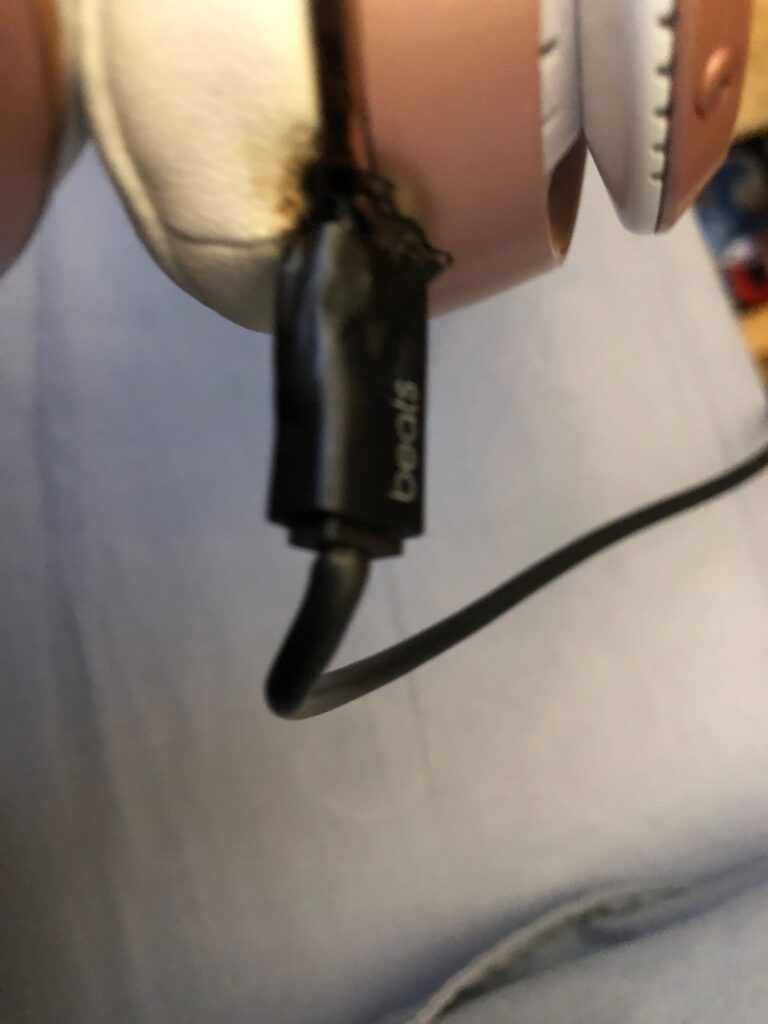
The existing review on this page describes a customer who says a charging cable melted into their headphones and that the support representative ended the call without resolving the concern. This is the reviewer’s reported experience and should not be treated as proof of a broader product defect or company-wide practice.
Because melted or overheated charging equipment can indicate a safety concern, customers experiencing a similar issue should stop using the equipment, disconnect it from power, preserve the product and cable, and contact Apple Support.
Helpful reviews identify the model, approximate purchase date, retailer, issue, support route, response time, and whether the matter was resolved.
Do not publish unsupported allegations of fraud, deliberate deception, criminal conduct, or company-wide misconduct. Describe what happened, what was communicated, what documentation exists, and what resolution was offered.
Fake Beats Support and Shopping Scam Warning
Use BeatsbyDre.com, Apple.com, Support.Apple.com, Apple’s Support application, an Apple Store, or a verified authorized retailer before providing account, order, payment, or product information.
Be cautious with:
- Fake Beats support telephone numbers
- Sponsored advertisements impersonating Apple Support
- Counterfeit Beats websites
- Unauthorized marketplace sellers
- Fake product-registration pages
- Fake warranty-extension offers
- Remote-access support scams
- Fake replacement or refund messages
- Fraudulent giveaway offers
- Requests for gift cards or cryptocurrency
- Requests for Apple Account passwords or verification codes
Apple Support does not need a customer’s Apple Account password or one-time security code to discuss an ordinary Beats support issue.
Do not allow an unverified caller to remotely control a computer or mobile device.
Beats Competitors and Related Corporate Office Pages
Beats competes in headphones, earbuds, wireless speakers, sports audio, portable audio, and related consumer-electronics categories.
Competitors and alternative brands include:
- Bose
- Sony
- Sennheiser
- JBL
- Skullcandy
- Samsung
- LG
- Microsoft
- Various gaming and specialty-audio brands
Apple’s AirPods products are part of the same parent company as Beats and should not be described as products from an unrelated corporate competitor.
Related corporate-office pages include:
Related Beats and Apple Resources
- Official Beats Website
- Official Beats Support
- Beats Frequently Asked Questions
- Contact Apple Support for Beats
- Beats International Support Numbers
- Beats Service and Repair
- Check Apple Warranty and AppleCare Coverage
- Check Repair Status
- Find an Apple Store or Authorized Service Provider
- Apple Order Listing
- Apple Returns and Refunds
- Beats User Guide
- Find a Beats Serial Number
- Register Beats
- Locate Beats With Find My
- Apple Service Programs and Recalls
- Beats Pill XL Recall
- Apple Privacy Policy
- Apple Privacy Request Portal
- Report Counterfeit Products
- Apple and Beats Careers
- Report an Unsafe Consumer Product
Frequently Asked Questions About Beats by Dre Corporate Office
Where is Beats by Dre headquarters?
Beats Electronics, LLC is commonly listed at 8600 Hayden Place, Culver City, CA 90232.
Is the Beats address in ZIP code 90210?
No. The previous “Culver City, Los Angeles, CA 90210” listing is inaccurate. Current business records identify the Culver City ZIP code as 90232.
What is the Beats corporate office phone number?
Beats does not prominently publish a separate Culver City corporate-switchboard number. The official United States and Canada Beats support number is 1-800-442-4000.
Is 1-800-442-4000 Beats Customer Service?
Yes. Apple publishes 1-800-442-4000 as a Beats support number for the United States and Canada, including purchasing help and questions about recent orders.
What is Apple’s corporate phone number?
Apple’s corporate office number is 1-408-996-1010.
Who owns Beats by Dre?
Beats Electronics is a subsidiary of Apple Inc.
Who founded Beats?
Beats was founded by Dr. Dre and Jimmy Iovine.
Does Apple provide Beats support?
Yes. Apple handles Beats telephone and chat support, warranties, AppleCare, repairs, replacements, order support, and service appointments.
How do I contact Beats technical support?
Call 1-800-442-4000 or use Apple’s online support system to request chat, telephone, repair, or appointment options.
How long is the Beats warranty?
The Apple Limited Warranty generally provides one year of hardware-repair coverage for manufacturing issues, in addition to applicable consumer-law rights.
Does the Beats warranty cover accidental damage?
The standard limited warranty generally does not cover accidental damage. Eligible AppleCare coverage may provide accidental-damage service subject to current terms and fees.
How long is complimentary Beats technical support?
Beats currently states that products include up to 90 days of complimentary technical support.
Where can I get Beats repaired?
Apple may offer mail-in service, Genius Bar assistance, or service through an Apple Authorized Service Provider.
Can I mail Beats to the Culver City headquarters?
No product should be mailed to the Culver City office without written return or repair instructions from Apple or Beats.
What is Apple’s return period for Beats?
Eligible Beats products purchased directly from Apple can generally be returned within 14 calendar days of receipt.
Can I return Beats purchased from another retailer to Apple?
A retail return normally must be made through the seller that completed the sale. Apple may still provide warranty service when the product qualifies.
How do I check a Beats order?
Use Apple’s Order Listing page or call Beats support at 1-800-442-4000.
How do I find my Beats serial number?
The serial number may appear on the product, inside the charging case, on the packaging, in Apple-device settings, or in the Beats Android application. The location depends on the model.
Can I locate lost Beats?
Compatible Beats configured in advance may be located through Apple Find My, iCloud.com/find, Locate My Beats, or Google Find My Device on supported models.
Does the warranty replace lost Beats?
No. Lost or stolen products are not normally covered by the Apple Limited Warranty.
How do I report counterfeit Beats?
Contact the seller or marketplace and use Apple’s online form for reporting suspected counterfeit or knockoff products.
Are Beats Pill XL speakers recalled?
Yes. Apple maintains a recall program for the Beats Pill XL because its battery may overheat and pose a fire risk. Owners should stop using the affected speaker and follow Apple’s instructions.
What should I do if a Beats cable melts or overheats?
Disconnect it from power when safe, stop using the equipment, preserve the product and cable, photograph the damage, and contact Apple Support. An unsafe product can also be reported to the CPSC.
How do I submit a Beats privacy request?
Use Apple’s official privacy portal. Do not post account credentials, order information, precise location data, or identity documents in a public review.
How do I apply for a job at Beats?
Search and apply through Apple’s official careers website.
Why Trust CorporateOfficeHeadquarters.com?
CorporateOfficeHeadquarters.com provides corporate-office, headquarters, address, telephone, ownership, support-route, complaint, and review information for electronics companies, technology brands, retailers, restaurants, hotels, financial institutions, healthcare companies, airlines, automotive companies, and other major organizations.
This page is designed to help readers distinguish the Beats Culver City business office from Beats Support, Apple Support, Apple online-order service, Apple Stores, Apple Authorized Service Providers, warranty service, AppleCare, recalls, privacy, careers, and Apple corporate headquarters.
Disclaimer
CorporateOfficeHeadquarters.com is not affiliated with Beats Electronics, LLC, Beats by Dre, Apple Inc., Dr. Dre, Jimmy Iovine, any Apple Store, any authorized retailer, any service provider, any employee, any shipping carrier, or any support representative.
This page is provided for general informational purposes only. It does not provide legal, warranty, product-safety, privacy, medical, electrical, financial, or technical advice.
Addresses, telephone numbers, support availability, product models, warranty terms, AppleCare benefits, repair prices, return periods, service options, recall remedies, privacy procedures, and complaint routes may change.
Review the official Beats and Apple policies that apply to the specific product, country, purchase, warranty, repair, or complaint.
For an active fire, smoke emergency, electrical emergency, serious injury, or immediate danger, contact emergency services.
Share Your Experience
Have you contacted Beats corporate headquarters, Beats Support, Apple Support, an Apple Store, an Apple Authorized Service Provider, Apple online-order support, warranty service, AppleCare, repair support, Find My assistance, recall support, privacy, careers, or another Beats or Apple department?
Share your experience with Beats headphones, earbuds, speakers, cables, an online order, shipment, return, refund, warranty, repair, replacement, AppleCare claim, battery, charging problem, lost product, counterfeit concern, recall, privacy request, or corporate escalation below.
Helpful reviews identify the Beats model, approximate purchase date, retailer, issue type, support route used, response time, and whether the matter was resolved.
Please do not publish complete serial numbers, order numbers, Apple Account information, passwords, verification codes, payment details, home addresses, telephone numbers, email addresses, repair identifiers, employee personal information, private correspondence, or screenshots containing personal data.