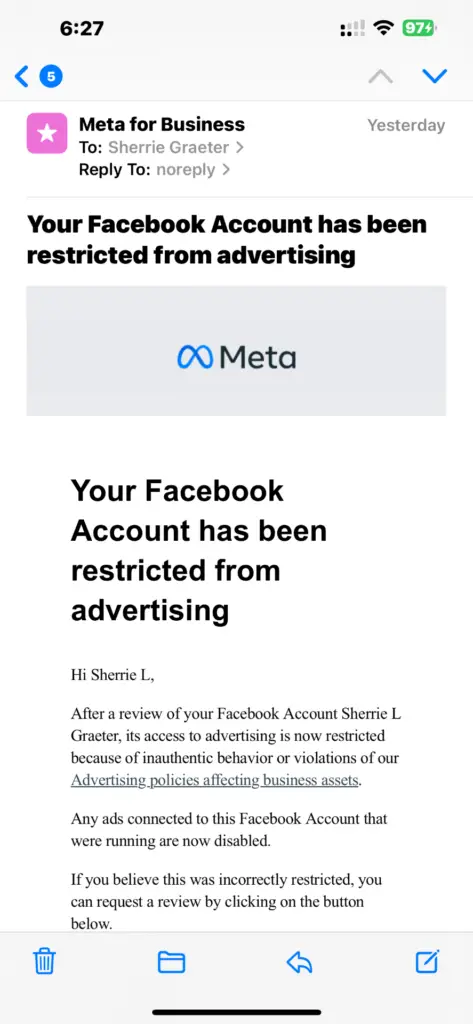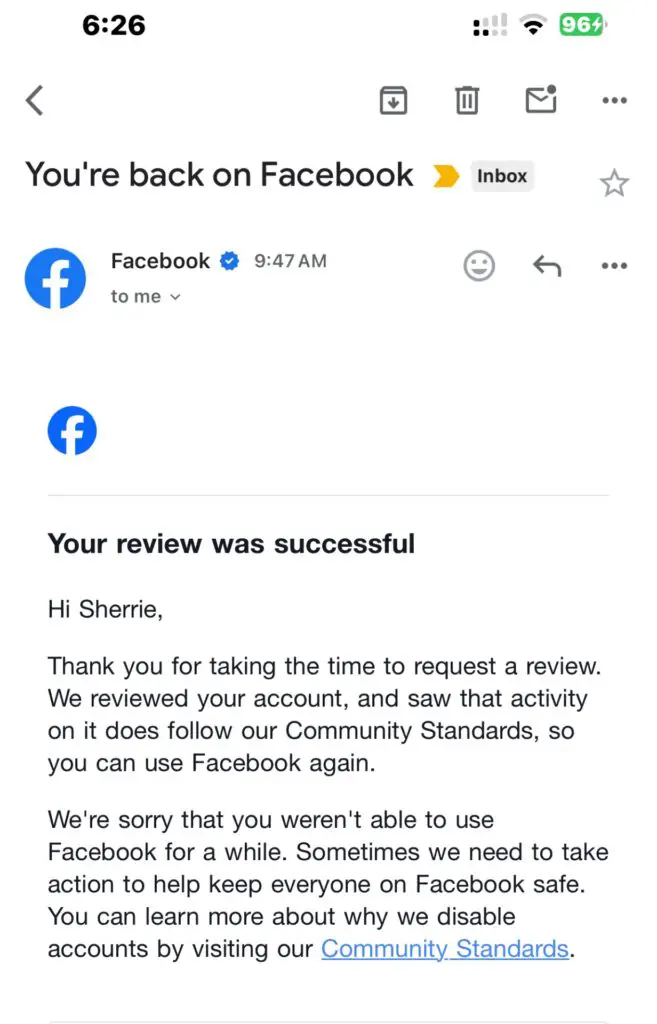
Facebook corporate office information is often searched by users who need the Facebook headquarters address, corporate office phone number, account escalation options, complaint routes, privacy resources, business support, or help with a disabled, hacked, suspended, or restricted account. Facebook is owned by Meta Platforms, Inc., headquartered in Menlo Park, California.
Facebook Corporate Office and Headquarters Contact Information
- Company / Platform: Facebook
- Parent Company: Meta Platforms, Inc.
- Meta Corporate Headquarters Address: 1 Meta Way, Menlo Park, CA 94025, USA
- Facebook / Meta Corporate Office Phone Number: 1-650-543-4800
- Official Facebook Website: Facebook.com
- Official Meta Website: About Meta
- Facebook Help Center: Facebook Help Center
- Meta Business Help Center: Meta Business Help Center
- Meta Investor Relations: Meta Investor Relations
Important: The Meta corporate office phone number is not a general Facebook customer service phone number. Facebook does not provide a general public phone number for customer service. For account, login, Marketplace, business, ads, privacy, copyright, trademark, and reporting issues, use the correct official online support route.
Facebook Headquarters and Parent Company Update
Facebook is no longer the legal corporate name of the public company. Facebook is a platform owned by Meta Platforms, Inc., which also operates Instagram, Messenger, WhatsApp, Threads, Meta Quest, and other products. The company’s principal executive office is in Menlo Park, California.
Older references to “Facebook, Inc.” or older Facebook headquarters phone numbers may be outdated. For corporate office and headquarters purposes, the most accurate company-level listing is Meta Platforms, Inc. at 1 Meta Way, Menlo Park, CA 94025.
Choose the Correct Facebook Support Route
For Facebook Account Login or Account Recovery Problems
Use the Facebook Help Center. For hacked-account issues, visit Facebook.com/hacked from a device you have used to log into Facebook before.
For Disabled, Suspended, or Restricted Accounts
Use the Facebook Help Center, account status tools, in-app notifications, and any appeal form shown inside your Facebook account. Corporate phone calls usually do not resolve disabled or restricted account cases.
For Facebook Marketplace Problems
Use Facebook’s Help Center and Marketplace support tools. Keep screenshots of the listing, order, buyer or seller messages, payment details, and delivery information. Be cautious if someone asks you to move a transaction off Facebook or pay through gift cards, wire transfer, cryptocurrency, or unfamiliar payment apps.
For Facebook Business, Ads, Pages, and Commerce Issues
Use the Meta Business Help Center. Some advertisers, businesses, commerce accounts, and Meta Verified subscribers may have access to chat, email, or direct support options after logging in.
For Privacy, Data, or Security Questions
Use Facebook’s official privacy tools, Privacy Center, account settings, and Help Center pages. Privacy and data requests should be handled through official Facebook or Meta account tools rather than third-party phone numbers.
For Copyright, Trademark, or Impersonation Reports
Use Facebook’s official intellectual property reporting forms. Facebook provides separate online routes for copyright reports, trademark reports, counterfeit concerns, impersonation, and content that may violate Community Standards.
What to Have Before Contacting Facebook or Meta Corporate Office
Before contacting Facebook, Meta, or a support route, gather:
- Your Facebook profile URL, Page URL, business account ID, or ad account ID
- The email address or phone number associated with the account
- Screenshots of error messages, suspension notices, appeal screens, or policy warnings
- Dates and times when the issue occurred
- Case numbers, support inbox messages, or appeal confirmations
- Marketplace listing details, order numbers, shipping information, or payment records
- Business Manager, Commerce Manager, Page, or ad account details if relevant
- A short timeline of what happened and what result you are requesting
How to Escalate a Facebook Complaint
Facebook complaints are usually handled through online tools rather than by phone. Start with the correct in-product route, such as the Facebook Help Center, account recovery tools, report-a-problem option, Meta Business Help Center, or intellectual property form.
If your complaint involves a business account, ad account, Meta Verified subscription, or commerce account, log into the related business tool and check whether live chat, email support, or a support inbox option is available. If your issue involves privacy, legal, trademark, copyright, impersonation, or safety concerns, use the official Meta or Facebook reporting form for that issue.
For unresolved consumer, privacy, scam, or billing issues, you may also consider keeping written documentation and contacting your payment provider, state consumer protection office, attorney general, or privacy regulator when appropriate.
Common Reasons People Contact Facebook Corporate Office
People search for the Facebook corporate office, Facebook headquarters, Facebook corporate phone number, or Meta headquarters address for issues such as:
- Disabled, suspended, or restricted Facebook accounts
- Hacked accounts or account recovery problems
- Marketplace scams, missing orders, or seller disputes
- Business Page access problems
- Ad account restrictions or billing issues
- Copyright, trademark, or impersonation reports
- Privacy, data, or account security concerns
- Problems with appeals or automated enforcement decisions
- Difficulty reaching a human support representative
- Corporate, investor, media, or legal inquiries involving Meta
Issue-Specific Facebook Complaint Guidance
Disabled or Suspended Facebook Account
Use the appeal or review option shown in your account. Save screenshots of each message, appeal page, and response. If the account is tied to a business, Page, or ad account, also check Meta Business Support Home after logging in.
Hacked Facebook Account
Visit Facebook.com/hacked from a device you have used before. Change passwords on your email account as well as Facebook, review two-factor authentication settings, and check for unfamiliar emails, phone numbers, connected apps, and payment methods.
Facebook Marketplace Scam or Payment Problem
Keep all messages inside Facebook when possible. Save screenshots, tracking numbers, payment confirmations, and delivery records. Report the buyer, seller, listing, or transaction through Facebook’s official reporting tools. For credit card or payment disputes, contact your payment provider quickly.
Facebook Business, Page, or Ads Issue
Use the Meta Business Help Center and Business Support Home. Have your Business Manager ID, Page URL, ad account ID, payment method details, and screenshots of policy or billing notices ready.
Copyright, Trademark, and Impersonation Issues
Use Facebook’s official intellectual property and impersonation reporting tools. Include links to the violating content, proof of ownership, registration numbers if available, and a clear explanation of the rights issue.
Scam and Fake Facebook Support Number Warning
Be careful when searching online for a Facebook customer service phone number, Facebook corporate phone number, Facebook complaint line, Facebook recovery number, or Meta support number. Many unofficial websites and sponsored listings publish fake Facebook support numbers.
Facebook does not provide a general public customer service phone number. Do not give your password, two-factor authentication code, credit card information, remote computer access, gift card numbers, crypto wallet details, or banking information to anyone claiming they can recover your Facebook account by phone. Use Facebook.com, Meta.com, the Facebook app, the Help Center, and official logged-in support tools.
Facebook Reviews and Complaints
Current CorporateOfficeHeadquarters.com reader comments include individual complaints about disabled or suspended accounts, unclear appeal decisions, Marketplace restrictions, repeated Help Center messages, lack of human support, and difficulty getting responses from Facebook or Meta.
These comments reflect individual reader experiences and should not be treated as universal facts about every Facebook account or support case. If you have used Facebook’s Help Center, account recovery tools, Meta Business Support, or corporate office contact routes, you can share your experience below.
About Facebook
Facebook is a social networking platform owned by Meta Platforms, Inc. The platform allows users to connect with friends and family, join groups, follow Pages, share photos and videos, buy and sell on Marketplace, and interact with businesses, creators, and communities. Facebook is part of Meta’s larger family of apps and technology products.
Competitors and Related Corporate Office Pages
Facebook competes with and connects to a broader group of social media, messaging, creator, search, advertising, and technology platforms. Readers researching related corporate offices may also want to review Instagram Corporate Office, TikTok Corporate Office, X Corporate Office, Google Corporate Office, Snapchat Corporate Office, and AOL Corporate Office.
Related Resources
- Official Facebook Help Center
- Facebook Hacked Account Recovery
- Meta Business Help Center
- Facebook Intellectual Property Help
- Official Meta Website
- Meta Investor Relations
- Facebook Customer Service on CSN
- Instagram Corporate Office
- TikTok Corporate Office
- X Corporate Office
Frequently Asked Questions About Facebook Corporate Office
Where is Facebook corporate office located?
Facebook is owned by Meta Platforms, Inc. Meta’s principal executive office is located at 1 Meta Way, Menlo Park, CA 94025.
What is the Facebook corporate office phone number?
Meta’s main corporate office phone number is 1-650-543-4800. This is a corporate office number, not a general Facebook customer service phone number.
Does Facebook have a customer service phone number?
Facebook does not provide a general public customer service phone number. Most Facebook support issues are handled through the Facebook Help Center, account recovery tools, reporting forms, and logged-in support options.
Is Facebook still Facebook, Inc.?
No. Facebook is now a platform owned by Meta Platforms, Inc. Older references to Facebook, Inc. may be outdated for corporate office and legal-company purposes.
How do I contact Facebook about a hacked account?
Visit Facebook.com/hacked from a device you have used to log into Facebook before. Follow the account recovery steps and review your security settings.
How do I contact Facebook about a disabled or suspended account?
Use the appeal, review, or account-status tools shown when you log in. If the account is tied to a business, Page, commerce account, or ad account, also check Meta Business Support Home.
How do I contact Facebook for business or ads support?
Use the Meta Business Help Center. Eligible advertisers, commerce accounts, and paid support users may see additional chat, email, or support inbox options after logging in.
How do I report a fake Facebook support phone number?
Do not call or pay unofficial Facebook support numbers. Report suspicious pages, ads, or profiles through Facebook’s reporting tools and use only official Facebook, Meta, or logged-in support pages.
Is CorporateOfficeHeadquarters.com affiliated with Facebook or Meta?
No. CorporateOfficeHeadquarters.com is not affiliated with Facebook, Meta Platforms, Inc., Instagram, WhatsApp, Messenger, or any Meta product. This page is for corporate office information, reviews, complaints, and consumer research.
Why Trust CorporateOfficeHeadquarters.com?
CorporateOfficeHeadquarters.com provides corporate office information, headquarters details, phone numbers, complaint guidance, and reader review space for major companies and brands. We update pages when company names, parent companies, addresses, phone numbers, support routes, or complaint processes change.
Page Update Note
This page was updated on June 28, 2026 to reflect Meta Platforms, Inc. as Facebook’s parent company, the current Meta headquarters address, the verified main corporate phone number, official Facebook support routes, scam-number warnings, and current COH review themes.
Disclaimer
CorporateOfficeHeadquarters.com is not affiliated with Facebook, Meta Platforms, Inc., Instagram, WhatsApp, Messenger, or any Meta product. This page is for informational, review, and complaint purposes only. For account recovery, privacy, security, legal, intellectual property, business, or advertising issues, use official Facebook and Meta support channels.
Share Your Experience
If you have contacted Facebook, Meta corporate office, the Facebook Help Center, Meta Business Support, account recovery, Marketplace support, or a Facebook complaint route, please share your experience below. Your review may help other readers understand which support options worked and what documentation was needed.